
10 KiB
MainWP-Client-Notes-For-Pro-Report

Requires: MainWP Pro Reports
Tested with: WordPress 6.x, MainWP 4.x
Version: 1.3.0
Release date: YYYY-MM-DD
What’s It Do?
This extension lets you add work notes and client notes on a per-site basis, filtered by date range, and automatically include them in your MainWP Pro Reports via special tokens.
What’s New in 1.3.0
-
Dedicated Database Table: Notes are now stored in
wp_mainwp_work_notesfor better scalability and performance. -
Three Token Outputs:
-
[client.customwork.notes]— legacy HTML table, minimal styling. -
[client.customwork.notes_table]— CSS-friendly HTML structure for reports/PDFs. -
[client.customwork.notes_email]— email-safe inline-styled table with selectable modes.
-
-
Flatpickr Date Picker: Localized, auto-selects today’s date, syncs with manual input.
-
Dynamic Save/Update Button: Automatically changes based on context.
-
Automatic Migration: Legacy
wp_options-based notes are migrated on upgrade. -
Manual Migration Fallback: Admin bar button to trigger migration if needed.
-
Strict Date Validation: Dates must be in
YYYY-MM-DDformat (picker enforced). -
Security & Stability: All database queries fully parameterized.
-
Future-Proof Cleanup: Legacy
wp_optionsdata auto-removed in v1.3.4+.
Changelog
1.3.0 – YYYY-MM-DD - Implemented dedicated wp_mainwp_work_notes table. -
Added [client.customwork.notes_table] and [client.customwork.notes_email]
tokens. - Integrated Flatpickr date picker with localization and default date
handling. - Added dynamic “Save Note” / “Update Note” button. - Added automatic
migration with manual admin bar trigger. - Enforced strict YYYY-MM-DD date
validation. - Parameterized all database queries. - Updated JS to remove
deprecated jQuery shorthands. - Prepared legacy data cleanup hooks for future
release.
Usage Instructions
-
Install the Extension

-
Access "Work Notes" from a Child Site Menu

-
Open the Work Notes Page

-
Add Your Notes and Use the Token
Use[client.customwork.notes]in your Pro Report template to include these notes in client-facing reports.
-
Your Notes Render in the Final Report

Tokens avaliable Since 1.3.0
This extension now exposes three tokens so you can choose the right output for your report/email workflow:
-
[client.customwork.notes] — Legacy output (kept exactly as before). Quick drop-in, minimal styling control.
-
[client.customwork.notes_table] — Class-based HTML (no inline styles). Best for HTML/PDF reports where you can add Custom CSS.
-
[client.customwork.notes_email] — Email-safe output using inline styles only (broad email client compatibility).
Quick examples
Class-based token + CSS (reports/PDFs):
[client.customwork.notes_table]
Add CSS in your Pro Reports template:
.client-notes { margin: 24px 0; font-size: 14px; line-height: 1.5; }
.client-notes__table { width: 100%; border-collapse: collapse; border: 1px solid #e5e7eb; }
.client-notes__table thead th { background: #f3f4f6; text-align: left; padding: 10px 12px; font-weight: 600; border-bottom: 1px solid #e5e7eb; }
.client-notes__table td { padding: 10px 12px; vertical-align: top; border-top: 1px solid #f1f5f9; }
.client-notes__table tbody tr:nth-child(odd) td { background: #fafafa; }
.client-notes__date { white-space: nowrap; width: 160px; }
.client-notes__content { word-break: break-word; }
Legacy & no styles table output
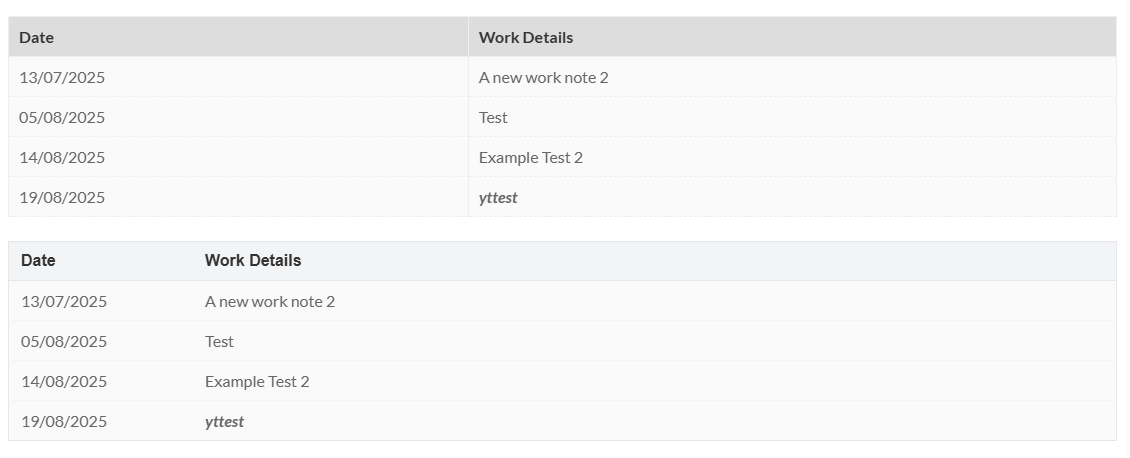
Example Styles applied
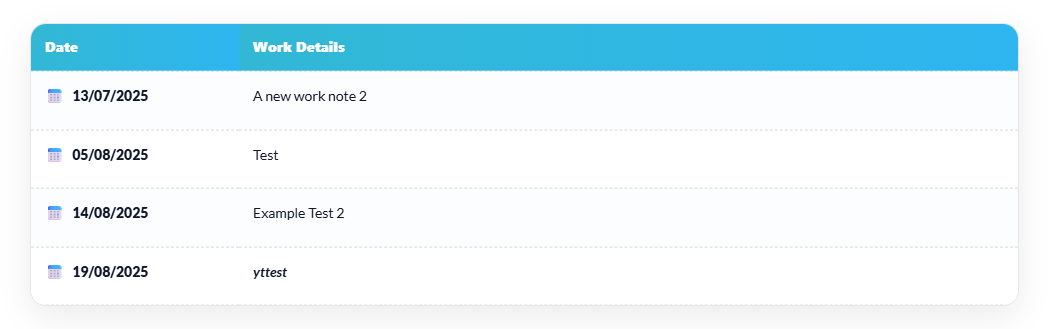
**Email token (inline styles): **
[client.customwork.notes_email]
Example Branded Email token filter styled this works also with the client report extension if you don’t use pro-reports
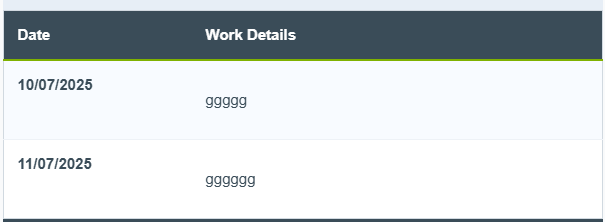
add_filter( 'mainwp_client_notes_email_modes', function( $modes ) {
    $modes['branded'] = array(
        'table'      => 'border-collapse:collapse;border:1px solid #d1d9e0;width:100%;min-width:100%;font-family:Arial,Helvetica,sans-serif;font-size:15px;line-height:1.6;background:#ffffff;',
        'th'         => 'background:#3a4c58;color:#ffffff;text-align:left;padding:12px 14px;border-bottom:2px solid #7fb100;',
        'td'         => 'padding:12px 14px;vertical-align:top;border-top:1px solid #eef2f7;color:#3a4c58;',
        'date_td'    => 'white-space:nowrap;width:160px;font-weight:bold;',
        'content_td' => 'word-break:break-word;',
        'odd_bg'     => '#F8FBFF',
        'even_bg'    => '#FFFFFF',
        'table_role' => 'presentation',
        // optional: set to true if you want a header-less list look
        // 'hide_header' => false,
    );
    return $modes;
} );

add_filter( 'mainwp_client_notes_email_active_mode', function( $mode ) {
    return 'branded';
}, 10, 1 );
Works without extra CSS and stays compatible with most email clients.
Developer Hooks (Filters)
You can tailor both the class-based and email tokens without editing core.
Columns
Filter labels, order, or hide a column entirely.
add_filter( 'mainwp_client_notes_columns', function( $cols ) {
    // Rename headers or remove a column
    $cols['date']    = __( 'Work Date', 'textdomain' );
    // unset( $cols['content'] ); // to hide
    return $cols;
} );
Per-cell HTML (both tokens)
Modify or decorate cell content (icons, badges, etc.).
add_filter( 'mainwp_client_notes_cell_content', function( $html, $key, $note ) {
    if ( 'date' === $key ) {
        return '<strong>' . $html . '</strong>';
    }
    // Example: prepend a bullet
    return '• ' . $html;
}, 10, 3 );
Class-based token: classes
Swap class names globally.
add_filter( 'mainwp_client_notes_table_classes', function( $classes ) {
    return array(
        'wrapper' => 'my-notes',
        'table'   => 'my-notes__table',
        'date'    => 'my-notes__date',
        'content' => 'my-notes__content',
    );
} );
Class-based token: attributes
Add arbitrary attributes (ids, data-*).
add_filter( 'mainwp_client_notes_table_attributes', function( $attrs ) {
    $attrs['wrapper']['id'] = 'client-notes-scope';
    $attrs['table']['data-report'] = 'work-notes';
    return $attrs;
} );
Email token: inline styles
Central place to brand colors, spacing, fonts.
add_filter( 'mainwp_client_notes_email_styles', function( $s ) {
    $s['table']   = 'border-collapse:collapse;border:1px solid #d0d7de;width:100%;font-family:Arial,Helvetica,sans-serif;font-size:15px;line-height:1.6;';
    $s['th']      = 'background:#0f172a;color:#fff;text-align:left;padding:12px 14px;border-bottom:1px solid #0b1220;';
    $s['td']      = 'padding:12px 14px;vertical-align:top;border-top:1px solid #eef2f7;';
    $s['odd_bg']  = '#f8fafc';
    $s['even_bg'] = '#ffffff';
    $s['date_td']    = 'white-space:nowrap;width:160px;';
    $s['content_td'] = 'word-break:break-word;';
    return $s;
} );
Email token: per-row styles
Compute backgrounds (or future row-level props) per row/note.
add_filter( 'mainwp_client_notes_email_row_styles', function( $row_styles, $row, $note ) {
    // Example: highlight rows in the last 3 days
    $is_recent = ( time() - strtotime( $note->work_date ) ) < 3 * DAY_IN_SECONDS;
    if ( $is_recent ) {
        $row_styles['bg'] = '#fffbe6'; // soft highlight
    }
    return $row_styles;
}, 10, 3 );
Which token should I use?
-
Reports/PDFs (support for CSS): use
[client.customwork.notes_table]and add CSS. -
Emails & Client Reports (Not Pro-Report) (no CSS support): use
[client.customwork.notes_email]. -
Legacy templates: continue using
[client.customwork.notes].

