|
|
||
|---|---|---|
| assets | ||
| includes | ||
| languages | ||
| vendor | ||
| .gitignore | ||
| composer.json | ||
| composer.lock | ||
| hub2wp.php | ||
| readme.md | ||
| readme.txt | ||

hub2wp
hub2wp is a WordPress plugin that lets you discover, install, and update plugins and themes hosted on GitHub directly from your WordPress dashboard. By leveraging GitHub's ecosystem, it provides a straightforward way to extend your WordPress site beyond the resources available on WordPress.org.
hub2wp does not require any changes to existing plugins or approvals from a central authority to make themes and plugins discoverable or updatable. All it takes is for developers to add the wordpress-plugin/wordpress-theme tag to their public GitHub repository. hub2wp automatically verifies that a repository is a valid WordPress extension. Thousands of valid plugins and themes are already available on GitHub, ready to be installed right away!
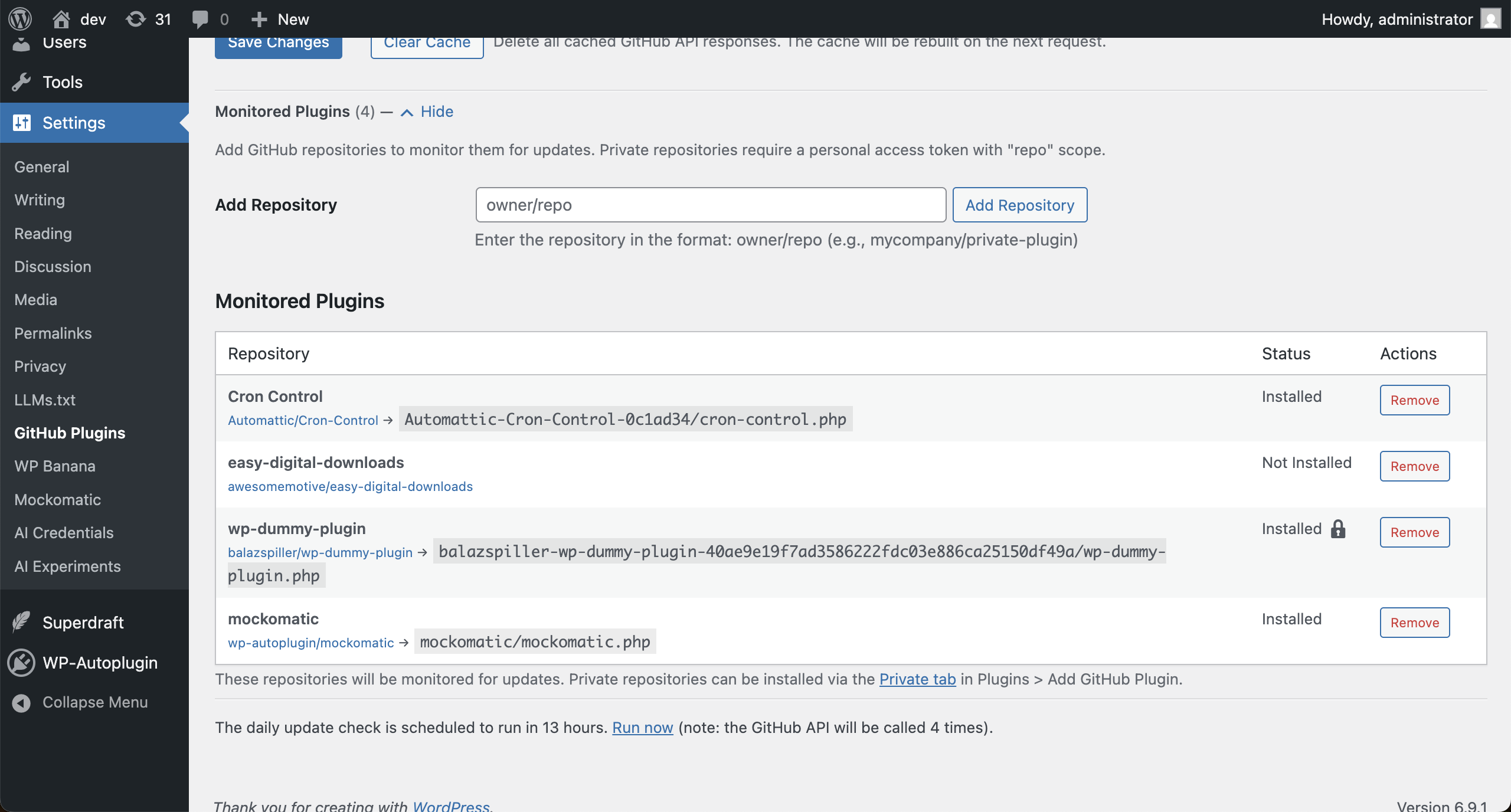
Private repositories are also supported, and you can manually set up update monitoring for themes and plugins installed outside hub2wp.
Also check out the hub2wp Plugin Repository a public website to browse, search, and explore WordPress plugins hosted on GitHub.
Features
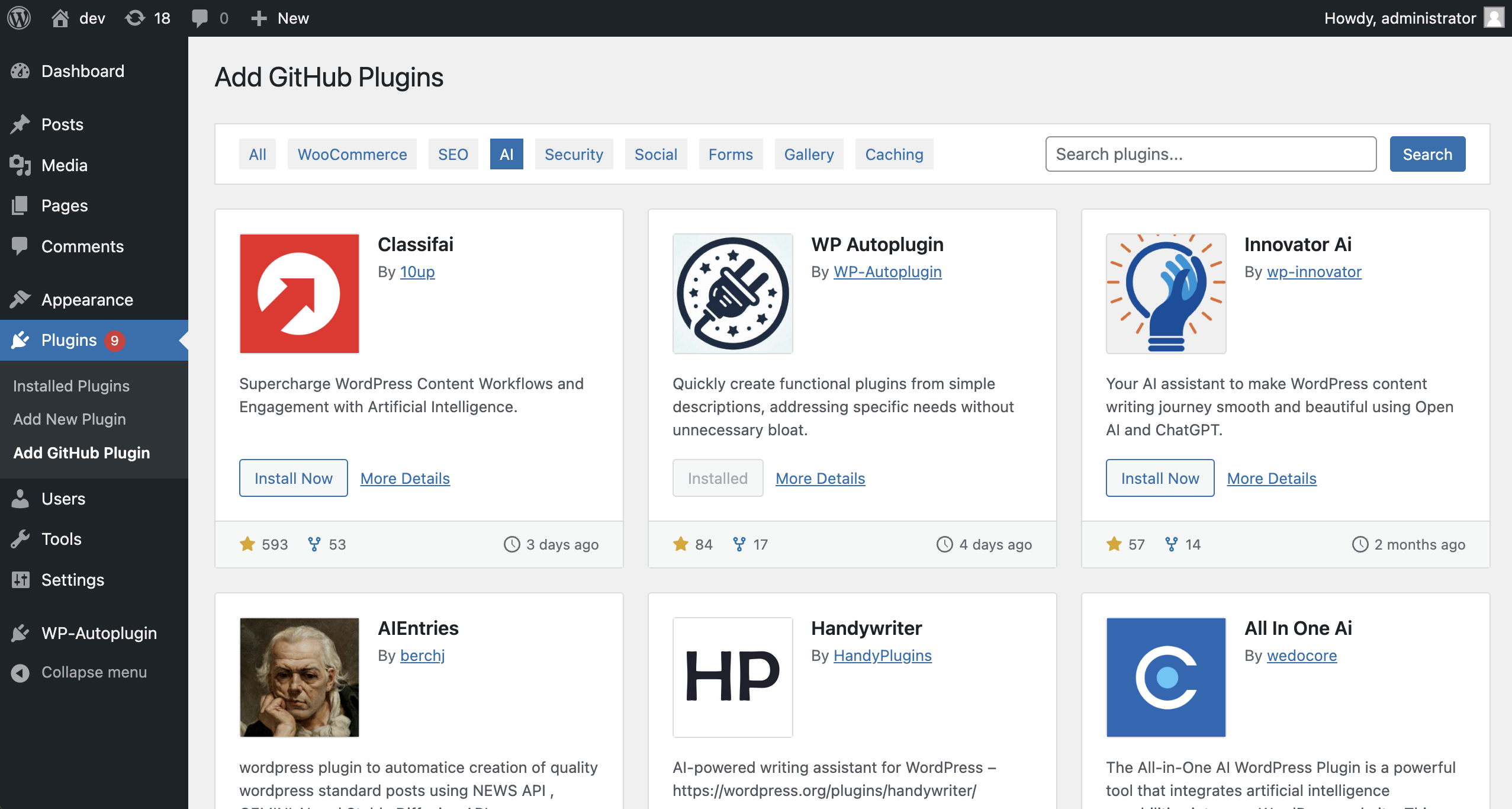
- Search GitHub Plugins and Themes: Browse and search repositories on GitHub to find plugins and themes that meet your needs.
- Install with One Click: Easily add GitHub-hosted plugins and themes to your site.
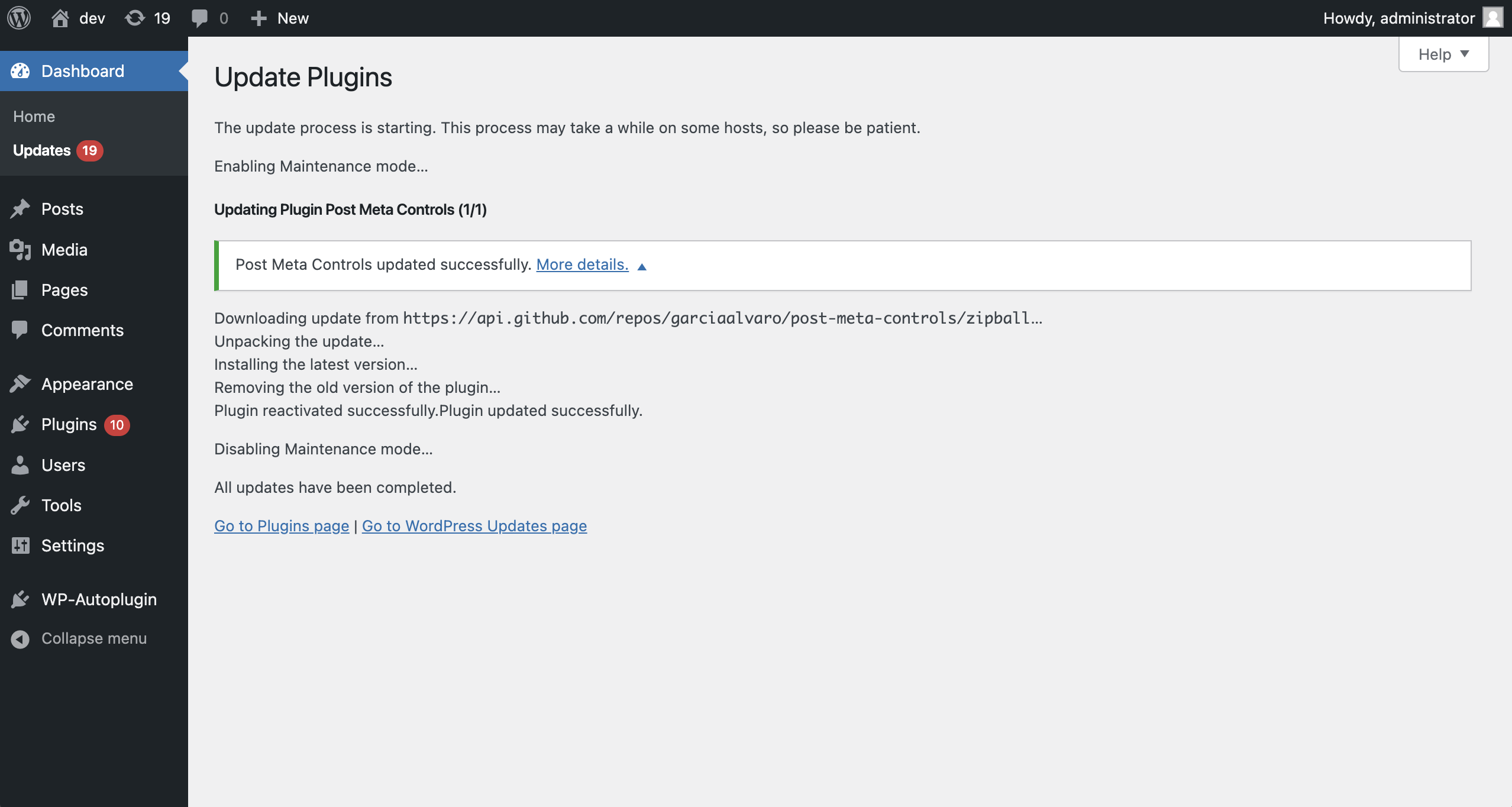
- Update Management: Receive notifications and perform updates for GitHub plugins and themes directly from your admin panel, like you would for WordPress.org plugins.
- Optional GitHub Token Support: Increase the GitHub API rate limit by adding a personal access token. Normal usage does not require a token, thanks to GitHub's generous API limits for unauthenticated requests.
- Caching: Built-in caching minimizes API requests for faster performance and reduced API quota usage.
- Manual Update Monitoring: Set up update monitoring for plugins and themes installed outside hub2wp.
- Private Repository Support: Browse, install, and update plugins and themes from private GitHub repositories.
- Custom Branch Tracking: Track a specific branch for updates instead of the repository's default branch.
How It Works
-
Plugin and Theme Eligibility: To appear in hub2wp, a repository must have the
wordpress-pluginorwordpress-themeGitHub topic. Plugins also need aStable tag:header in theirreadme.txtorreadme.md, and themes need aVersion:header instyle.css. These version headers are used for update monitoring. -
Update Mechanism: hub2wp checks the
Stable tag:orVersion:header in a repository branch to manage updates. By default it uses the repository's default branch, but you can configure a specific branch to track for each plugin or theme. When a new version is detected, you will receive an update notification in your WordPress dashboard, allowing you to update the plugin or theme directly from there. -
Installation:
- Download the latest release from the Releases page.
- Upload the ZIP file via the 'Plugins' screen in WordPress or extract it to the
/wp-content/plugins/directory. - Activate hub2wp from the 'Plugins' menu.
- Start exploring GitHub plugins under "Plugins > Add GitHub Plugin". Browse themes by clicking on the "GitHub Themes" button under "Appearance > Themes".
-
Configuration (Optional):
- Add a personal GitHub token in “Settings > GitHub Plugins” to increase API limits and access private repositories.
- Adjust caching settings for optimized performance.
- Set up update monitoring for manually installed plugins and themes.
Roadmap
hub2wp will continue to evolve with the following planned features:
- Release Tracking: Monitor GitHub releases for updates instead of just the default branch.
- Full WP-CLI Integration: Provide WP-CLI commands for managing GitHub plugins via the command line.
Screenshots
GitHub Plugin Browsing
Plugin Details Popup

Set up Update Monitoring for Plugins on the Settings Page
Update Processing via GitHub API
FAQs
Do I need a GitHub token?
No, but adding one increases the API request limit, which may be useful for high usage scenarios. Without a token, you can make up to 60 API requests per hour, which is sufficient for most users. You only need a token if you have a large number of plugins or if you want to use private repositories.
Will this plugin interfere with WordPress.org plugins?
No, hub2wp operates independently of WordPress.org and only manages plugins sourced from GitHub.
What happens if a plugin is updated on GitHub?
hub2wp will check for updates based on the Stable tag: version in the default branch. If a new version is detected, you will receive an update notification in your WordPress dashboard, allowing you to update the plugin directly from there.
Can I use hub2wp for private repositories?
Yes, you can add private repositories to hub2wp by providing a GitHub token with the appropriate permissions. Private repositories will be listed in a separate tab in the plugin browser.
Contribution
hub2wp is open source and welcomes contributions. If you encounter issues or have suggestions, please create an issue or pull request in the GitHub repository.
Changelog
See readme.txt for the full changelog.

