| Config | ||
| Database | ||
| docs | ||
| Http | ||
| Providers | ||
| Public | ||
| Resources | ||
| .gitignore | ||
| composer.json | ||
| composer.lock | ||
| module.json | ||
| README.md | ||
| start.php | ||

FreeScout Shopify Integration Module
A FreeScout module that integrates with Shopify to display customer order history directly in the conversation sidebar, providing support teams with instant access to order information.



Features
📦 Order Display
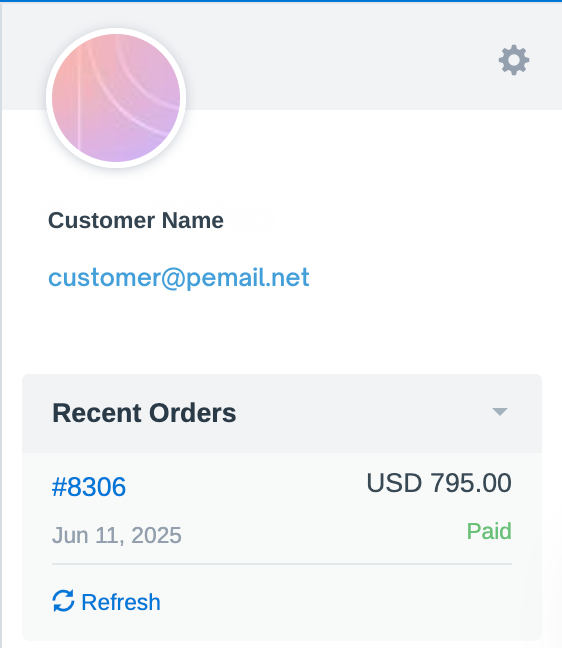
- Recent Orders Widget: Shows up to 5 most recent orders in the conversation sidebar
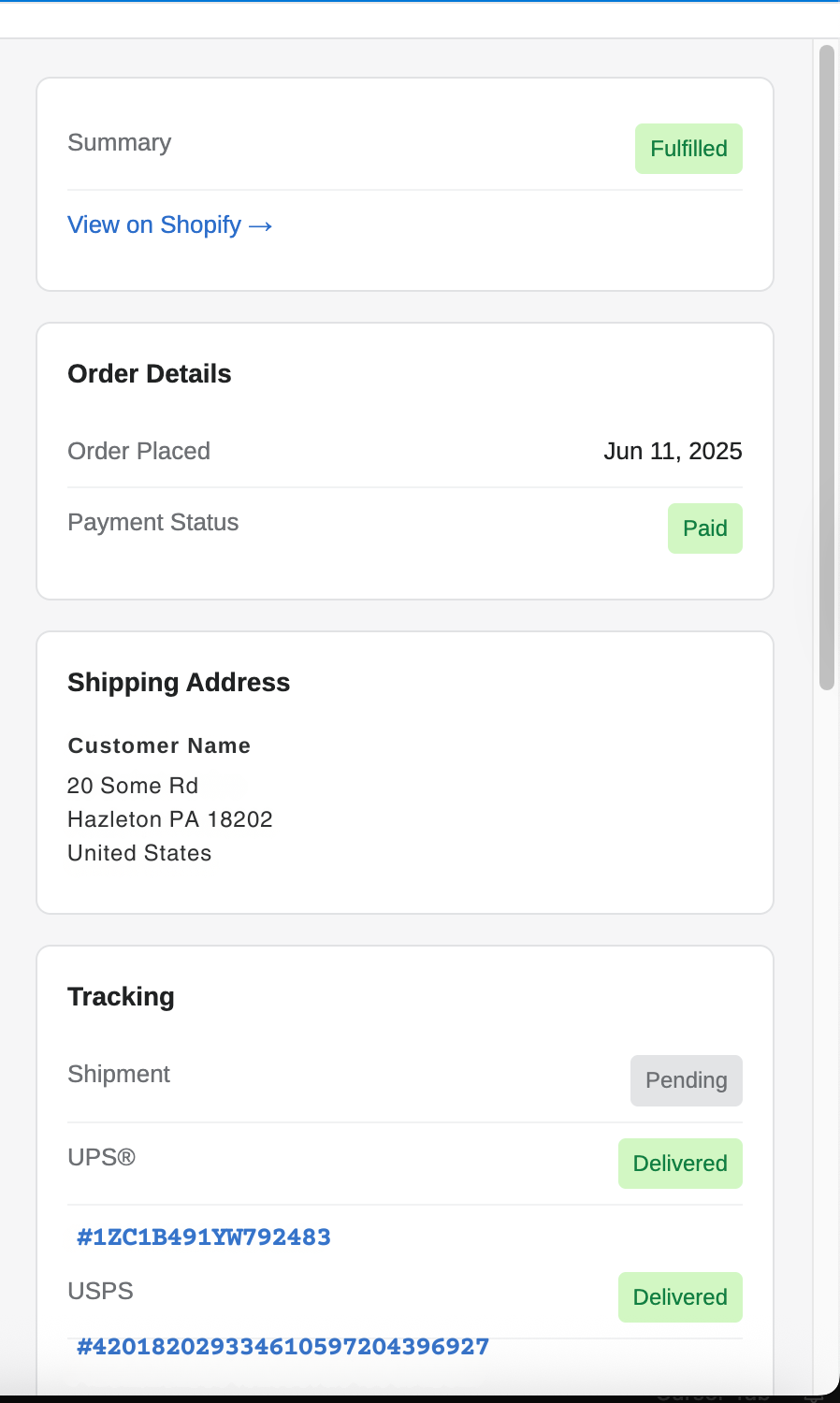
- Slide-Out Panel: Click any order to view comprehensive details in a beautiful slide-out panel
- Order Information:
- Order number, date, and total
- Payment and fulfillment status
- Shipping address
- Tracking numbers with clickable links
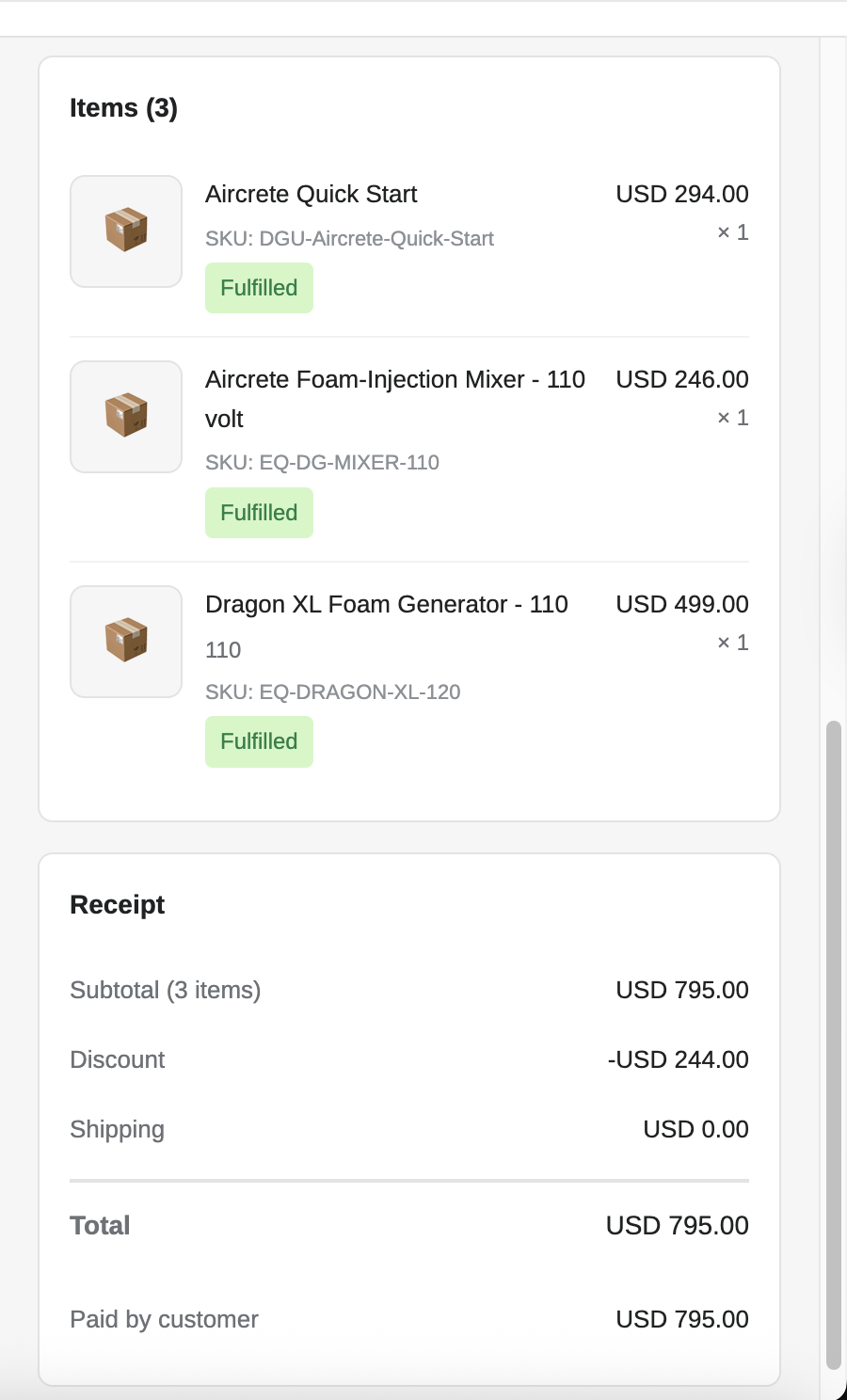
- Line items with product names, SKUs, quantities, and prices
- Receipt breakdown (subtotal, discounts, shipping, tax, total)
⚡ Performance Optimization
- Customer ID Caching: Stores Shopify customer IDs in the database to reduce API calls
- First lookup: 2 API calls (customer search + orders fetch)
- Subsequent lookups: 1 API call (orders fetch only)
- Order Caching: Orders cached for 60 minutes to minimize API usage
- Efficient API Usage: Only loads orders when viewing a conversation
🔧 Flexible Configuration
- Two-Tier Settings:
- Global settings for all mailboxes
- Per-mailbox overrides for different Shopify stores
- Environment Variables: Support for
.envconfiguration
🎨 User Interface
- Clean, modern design matching Shopify's aesthetic
- Smooth slide-out animation for order details
- Status badges for payment and fulfillment
- Responsive layout
- Hover effects and visual feedback
Requirements
- FreeScout 1.8.190 or higher
- PHP 7.3 or higher
- MySQL/MariaDB
- Shopify store with Admin API access
Installation
1. Install the Module
cd /path/to/freescout/Modules
git clone https://github.com/Joelhaggar/freescout_module_shopify.git Shopify
cd Shopify
composer install
2. Run Migrations
php artisan migrate
This creates:
shopifycolumn inmailboxestable (for per-mailbox settings)shopify_customer_idcolumn incustomerstable (for customer ID caching)
3. Enable the Module
php artisan module:enable "Shopify Integration"
4. Clear Caches
php artisan cache:clear
php artisan config:clear
php artisan view:clear
Shopify Setup
1. Create a Custom App
- Go to your Shopify Admin
- Navigate to Settings → Apps and sales channels → Develop apps
- Click Create an app
- Give it a name (e.g., "FreeScout Integration")
2. Configure API Scopes
- Click on your app
- Go to Configuration tab
- Under Admin API integration, click Configure
- Enable these scopes:
read_customers- Required to search for customers by emailread_orders- Required to fetch customer orders
- Click Save
3. Install the App
- Click Install app button
- Confirm the installation
4. Get Access Token
- After installation, click Reveal token once to see your Admin API access token
- Copy this token - it starts with
shpat_ - ⚠️ Important: You can only view this token once! Save it securely.
Configuration
Global Settings
Configure default settings for all mailboxes:
- Go to Settings → Shopify in FreeScout
- Enter:
- Shop Domain: Your store's domain (e.g.,
your-store.myshopify.com) - Access Token: The Admin API access token from Shopify
- API Version: The API version (e.g.,
2025-01)
- Shop Domain: Your store's domain (e.g.,
- Click Save
Per-Mailbox Settings (Optional)
Override global settings for specific mailboxes:
- Go to Manage → Mailboxes
- Select a mailbox
- Click Shopify in the left menu
- Configure mailbox-specific settings
- Click Save
Environment Variables (Optional)
You can also configure via .env:
SHOPIFY_SHOP_DOMAIN=your-store.myshopify.com
SHOPIFY_ACCESS_TOKEN=shpat_your_access_token_here
SHOPIFY_API_VERSION=2025-01
Usage
Viewing Orders
- Open any conversation in FreeScout
- Look for the Recent Orders section in the right sidebar
- Orders are automatically loaded for the customer's email address
Order Details Panel
- Click on any order in the list
- A slide-out panel opens from the right showing:
- Order summary and status badges
- Link to view order in Shopify admin
- Order date and payment status
- Full shipping address
- Tracking information with clickable links
- All line items with products, quantities, and prices
- Complete receipt breakdown
- Close the panel by:
- Clicking the X button
- Clicking the dark overlay
- Pressing ESC key
Refreshing Orders
Click the Refresh link below the order list to fetch the latest data from Shopify.
Technical Details
Architecture
- Laravel Module System: Uses FreeScout's module structure
- Eventy Hooks: WordPress-style action/filter system for integration
- Service Provider Pattern: Clean separation of concerns
- REST API: Uses Shopify Admin REST API (not GraphQL)
API Endpoints Used
- Customer Search:
/admin/api/{version}/customers/search.json?query=email:{email} - Customer Orders:
/admin/api/{version}/customers/{customer_id}/orders.json?status=any&limit=5
Database Schema
mailboxes.shopify (TEXT, nullable)
{
  "shop_domain": "store.myshopify.com",
  "access_token": "shpat_...",
  "api_version": "2025-01"
}
customers.shopify_customer_id (VARCHAR, nullable, indexed)
Stores Shopify customer ID for fast subsequent lookups
Caching Strategy
- Customer IDs: Stored permanently in database
- Orders: Cached for 60 minutes in Laravel cache
- Cache keys:
- Global:
shopify_orders_{email} - Per-mailbox:
shopify_orders_{mailbox_id}_{email}
- Global:
Development
File Structure
Modules/Shopify/
├── Config/
│   └── config.php                  # Module configuration
├── Database/
│   └── Migrations/                 # Database migrations
├── Http/
│   ├── Controllers/
│   │   └── ShopifyController.php  # AJAX and settings controllers
│   └── routes.php                  # Module routes
├── Providers/
│   └── ShopifyServiceProvider.php # Main service provider with hooks
├── Public/
│   ├── css/
│   │   └── module.css             # Styles for widget and panel
│   └── js/
│       ├── laroute.js             # Route definitions
│       └── module.js              # Frontend functionality
├── Resources/
│   └── views/                     # Blade templates
├── composer.json
├── module.json
└── README.md
Key Classes
ShopifyServiceProvider
- Registers hooks and event handlers
- API integration methods
- Settings management
ShopifyController
- Handles AJAX requests for order data
- Manages mailbox-specific settings
Hooks
// Settings menu integration
\Eventy::addAction('mailboxes.settings.menu', ...)

// Settings page
\Eventy::addFilter('settings.sections', ...)
\Eventy::addFilter('settings.section_params', ...)
\Eventy::addFilter('settings.section_settings', ...)

// Display widget in conversation sidebar
\Eventy::addAction('conversation.after_prev_convs', ...)

// Customer menu item
\Eventy::addAction('conversation.customer.menu', ...)
Troubleshooting
Orders Not Loading
-
Check API credentials:
- Verify shop domain format:
store.myshopify.com(nothttps://or custom domain) - Ensure access token is correct
- Check API version is valid (e.g.,
2025-01)
- Verify shop domain format:
-
Check API scopes:
- Confirm
read_customersandread_ordersscopes are enabled - Re-install the Shopify app if scopes were added later
- Confirm
-
Check logs:
tail -f storage/logs/laravel.log | grep Shopify
Widget Not Appearing
-
Module enabled?
php artisan module:list | grep Shopify -
Clear caches:
php artisan cache:clear php artisan view:clear -
Check customer email: Orders only appear if the customer's email matches a Shopify customer
API Rate Limits
Shopify REST API limits:
- Shopify Plus: 2 requests/second
- Other plans: 2 requests/second
The module's caching strategy minimizes API calls to stay well within limits.
Changelog
Version 1.0.0 (2025-10-24)
- Initial release
- Customer order history display
- Slide-out panel for order details
- Customer ID caching optimization
- Per-mailbox configuration support
- Order caching (60 minutes)
Credits
- Original Concept: Based on FreeScout's WooCommerce Integration module
- Developed by: Joel Haggar
- Built with: Claude Code
License
AGPL-3.0
Support
For issues, questions, or contributions, please visit: https://github.com/Joelhaggar/freescout_module_shopify
Screenshots
Order List in Sidebar
Orders appear automatically when viewing a conversation with a Shopify customer.
Order Details Panel
Click any order to view comprehensive details in a beautiful slide-out panel with:
- Order status and fulfillment badges
- Shipping address and tracking
- Product line items
- Complete receipt breakdown
Note: This module is not officially affiliated with Shopify or FreeScout.

